What working the queue actually looks like.
One queue, every store
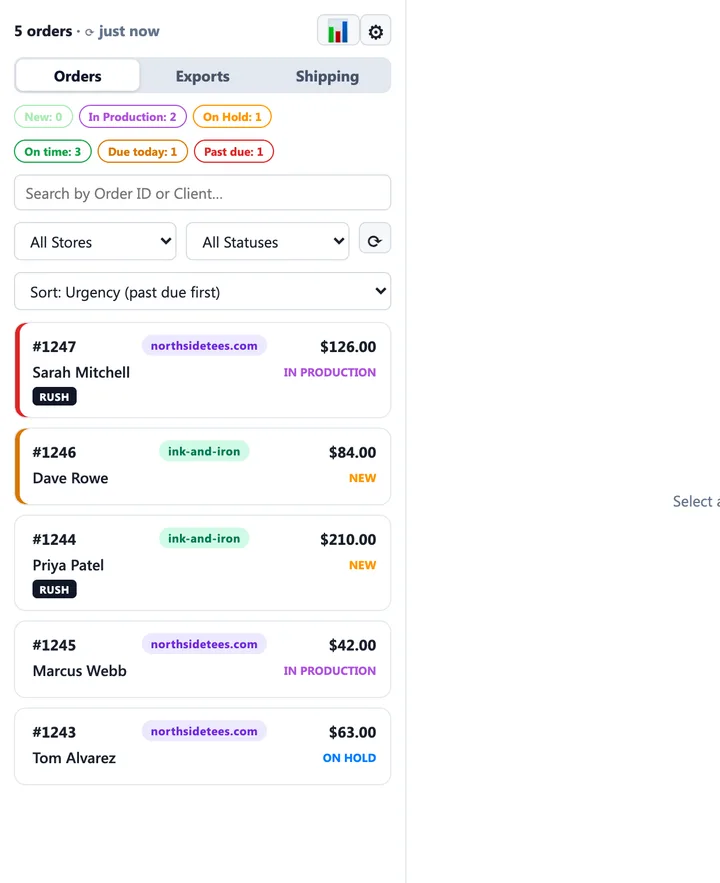
Connect as many WooCommerce and Shopify stores as you run. Flight Deck merges their open orders into one list and keeps each store's own vocabulary — including custom order statuses with the real names you gave them in your store admin.
- Urgency sort by default: past due, then due today, then rush, then by ship-by date
- Live filter chips for New, In Production, On Hold and due dates
- Search by order number, customer or store; filter by store or status
- Pause a store without losing its settings; monitor only the stores this machine should see
Print files, organised the way a print room thinks
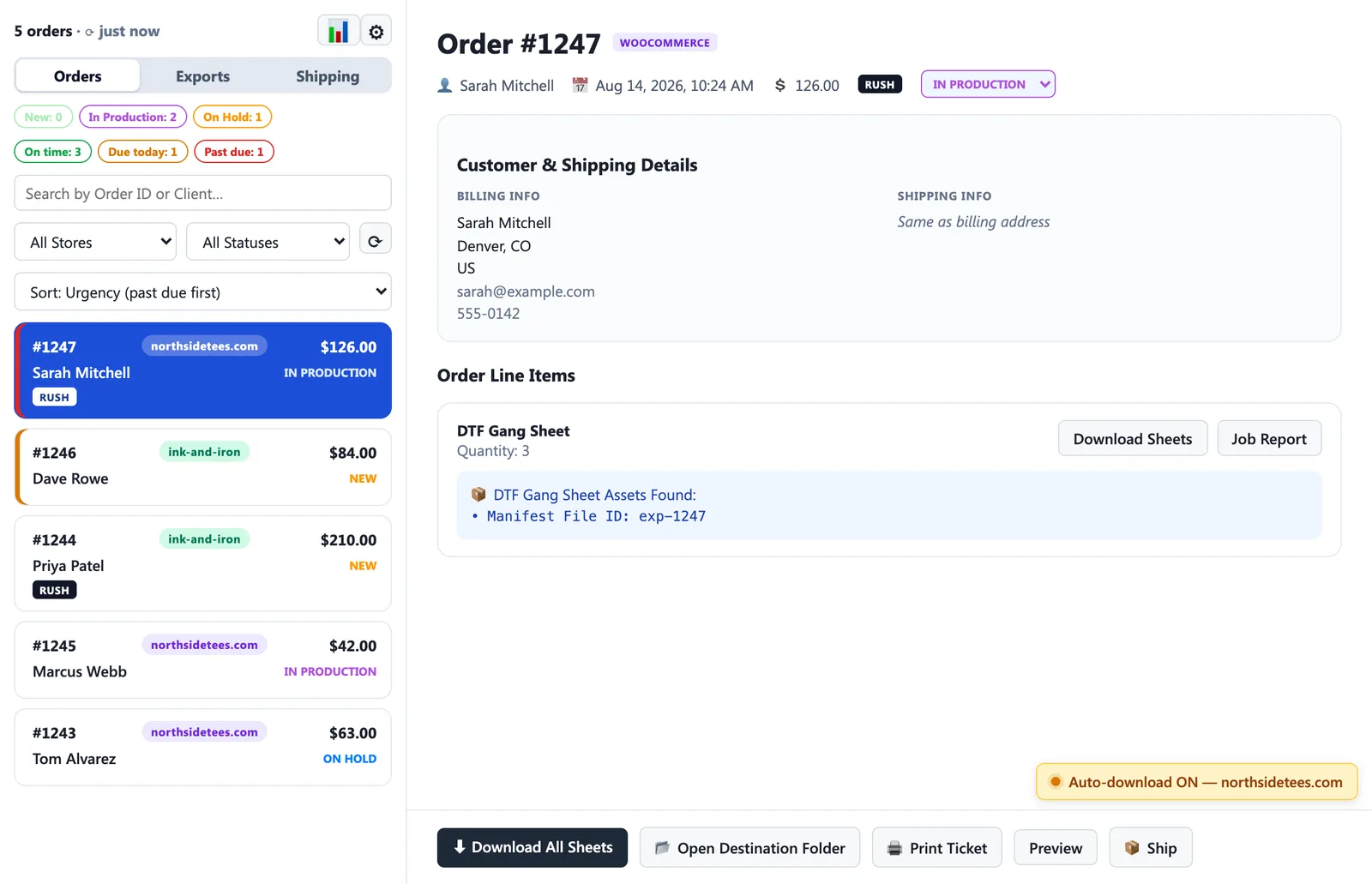
One click pulls an order's production sheets — or every line at once — straight from the cloud into a folder structure built for a hot-folder RIP: store, then download date, then order.
- Filenames carry the order and sheet letter;
x3-means print that sheet three times - Rush orders can be marked right in the filename, so priority shows in the folder listing
- Optional store name in filenames and a fixed suffix for a specific printer
- Each sheet set is billed once — re-downloads are always free, into the same folder
- Green ticks mark everything already pulled, so nothing gets printed twice or missed
Automation you arm per store
Every store has its own workflow, so every setting is per store — not one global switch you have to compromise on.
- Auto-download: new orders pull their own sheets as they arrive
- Auto-print: the production ticket is at the printer before you are
- After-download status: WooCommerce orders move to the status that store uses
- Shopify tagging: downloaded orders get tagged so you can filter them in Shopify admin
- Arming never touches the backlog — only orders placed after you switch it on, so you're never billed for history
Paperwork the print room can actually use
Two documents, both automatic. The job report is the visual map of what's on each sheet; the ticket is the paper that travels with the job.
- Job report PDFs saved next to every download — layout map, thumbnails, sizes, quantities
- Tickets print on 80mm/58mm thermal rolls or A4/Letter through the normal system driver
- Big RUSH banner, ship-by date, product list with sheet dimensions, totals, addresses
- Your own checklist footer lines, and a PDF preview so you tune the layout without wasting roll
It watches so you don't have to
Flight Deck sits in the menu bar or system tray with live counts, and tells you what changed — on your terms, per store.
- macOS menu bar: New / In Production counts, with amber “due today” and red “late” chips
- Windows taskbar and tray badges: red past-due, amber due today, otherwise open count
- Notify on any new order, or only when an order enters statuses you pick
- Notifications stay on screen until dismissed; clicking one opens that order
- Auto-refresh from every minute to hourly, or manual only
Labels, where the orders already are
The Shipping tab quotes and buys USPS, UPS and FedEx labels on your own EasyPost account — the money goes straight from you to the carrier and DTF Pilot adds nothing on top.
- Weight pre-filled from the order's gang sheet length, tuned to your film, always editable
- Your packages, your ship-from locations, per store — multi-location shops pick at buy time
- Batch mode: select orders, quote them all, buy in one confirmation
- 4×6 label prints to its own printer; tracking writes back to the order — WooCommerce gets the tracking number and status, Shopify gets a real fulfilment that clears the unfulfilled queue
- Test mode with sample labels so you can rehearse before any money moves
The orders that never touch a store
Most DTF work still arrives by phone, text and Facebook — from customers who can't use a web builder because there isn't one to use. Direct sales closes that gap without asking them to install anything, create an account, or pay online.
- Take the order at the counter: customer, address, turnaround, their reference, your own private note
- Send them a link by email or paste it into a text — no account, no app, nothing to sign up for
- They confirm the details you took down, add instructions, and build the gang sheet in the full builder
- It lands in the same queue as your store orders, on every computer you run Flight Deck on
- Print the same production ticket, buy the same label, from the same place
Your prices, applied without a second phone call
Quote the regular rate when they call. The builder does the rest as they lay the sheet out.
- Sold by length or area, priced per foot, inch, metre or centimetre, in your currency — inches optional
- Volume bands discount themselves: cross 10 ft and the rate drops on their screen, with no re-quote from you
- Set the price to zero and they see none at all — the right answer when you agree it on the phone
- A regular with a special rate gets it on their job alone, overriding the bands
- The price list is copied onto each job, so raising prices never moves a quote you already gave
- What they were quoted is frozen when they submit — that's the figure you invoice, identical on every machine
Nothing gets printed twice, nothing gets changed behind you
The awkward parts of taking artwork from a customer, handled by the app rather than by remembering.
- You pay when you download — a customer who builds a sheet and vanishes costs you nothing
- Artwork locks in production: their link then shows the status only — no form, no builder — so nobody edits what you've already printed. Moved it too early? Set the status back and their link works again
- An edit replaces the gang sheet and re-quotes on its new length; what it replaced is kept as the record
- If they correct the address you took down, the job says so — before you buy a label
- Their instructions print on the ticket, kept visually apart from your own private note
- Finished jobs move to Completed and stay there read-only; closed one by mistake, reopen it
Emails that look like they came from you
Your customer never sees our name. The builder link, and the note that their order shipped, go out as your shop.
- Your shop name or logo in the header, and replies land in your inbox
- Reply addresses are confirmed by a link we email — a typo can't silently swallow every customer reply
- More than one shopfront? Keep several, and pick which one a job goes out as
- Marking a job shipped emails them automatically, with the tracking link when you bought the label here — once, so a status nudged twice can't mail them twice
Your files and your numbers, always recoverable
Everything you've ever paid for stays available, and the reporting you'd otherwise export by hand is built in.
- Free re-downloads: anything your licence has paid for can be pulled again, from the order or the direct job — and Flight Deck says which machine already has it
- Reports: downloads, printed area, cost and sales by period and by store
- Light and dark themes, a built-in manual, and auto-updating on both platforms